The Ultimate Guide to Website Page Speed in 2026

The Ultimate Guide to Website Page Speed in 2026 (And How I Hit 100/100 For Free)

Voicu Horatiu
Voicu Horatiu

Post Date: March 6, 2026

Last Modified: March 6, 2026

Reading Time: 17 min read

Introduction: The Cost of a Second in the Attention Economy

1.1. Framing the modern web: We are fighting for milliseconds of human focus.

Nobody purposely designs a slow website, but in today's attention economy, we are no longer fighting for minutes of user engagement, we are fighting for absolute milliseconds. Despite the rapid advancement of internet infrastructure, the average web page in 2026 still takes 2.5 seconds to load on desktop and a sluggish 8.6 seconds on mobile. That might not sound like a lifetime, but in the modern web landscape, a single second of delay is the difference between a new customer and a lost opportunity.

1.2. The psychological shift in consumer patience over the last decade.

Over the last decade, consumer patience has decreased to a minimum. Users now expect instant gratification, and the data proves that slow sites actively sabotage businesses. Google officially recommends that your site loads in under three seconds. When page load times creep from 1 second to 3 seconds, the probability of a user bouncing increases by 32%. If your site takes 10 seconds to load, that bounce probability skyrockets by an astonishing 123%. The financial impact is just as harsh. For B2B websites, a page that loads in 1 second boasts a conversion rate 3 times higher than a site that takes 5 seconds to load. Mobile users are even less forgiving; for every single second of delay in mobile page load, conversions can go down by up to 20%. Even media giants aren't immune, a case study from the BBC revealed they lose an additional 10% of users for every single second their pages take to load.

1.3. A brief hook of what's to come.

You already know speed is critical. But how do you actually fix it without spending thousands of dollars on enterprise hosting or expensive developers?

In this guide, I am going to show you exactly how I achieved a flawless 100/100 Google PageSpeed Performance score with a First Contentful Paint of just 0.9 seconds. Best of all? I am going to show you how I modernized my entire workflow to build a lightning-fast, highly optimized website entirely for free.

The 20-Year Evolution of Web Performance (My Journey)

2.1. The beginning of web design: Building static sites in Adobe GoLive.

I have been building websites for 20 years. To give you an idea of how much the landscape has changed, my very first website was built using Adobe GoLive. Back then, web design was practically the "dark ages." We built incredibly simple, static HTML sites. While they lacked the dynamic features we take for granted today, they had one accidental advantage: they were inherently fast because there was hardly anything for the server to process.

2.2. The modern bloated web: How CMS platforms and heavy themes slowed everything down.

As the web matured, we demanded more functionality. We moved away from static files and embraced Content Management Systems (CMS) like WordPress. Suddenly, we had visual builders, endless plugins, and massive, heavy themes.
But this convenience came at a massive cost to performance. Traditional dynamic websites require server-side languages (like PHP) and heavy database queries (like MySQL) just to figure out what to show the user. If these processes aren't heavily optimized, they introduce significant delays before the browser even receives the first byte of data. My own legacy WordPress site fell victim to this exact bloat, becoming sluggish and frustrating to maintain. I realized it desperately needed a revamp.

2.3. The AI revolution: How I modernized my workflow

Instead of trying to patch up a bloated CMS, I decided to leverage the AI revolution. I started "vibe coding" a brand-new architecture using v0, synced the code to GitHub, and deployed it on Netlify for seamless, fast delivery.
However, v0 got a lot of traction, and I quickly realized that scaling it would burn through a lot of credits. To keep my infrastructure completely free, I transitioned my workflow to incorporate Google Antigravity. Armed with a few precise LLM prompts, I generated a lean, hyper-optimized website featuring a custom Blade Runner-inspired color scheme.
By abandoning CMS database bloat and using AI to write clean, modern code, I achieved the holy grail of web performance: a perfect 100 on Performance, 100 on Best Practices, and 100 on SEO.

Chapter 3: What Actually IS Page Speed Today? (The Core Web Vitals)

3.1. Moving beyond basic load time

For years, website owners fixated on a single metric: "fully loaded time." But that metric is fundamentally flawed because it doesn't reflect what the user actually experiences on their screen. A background script might still be downloading, but if the text and images are fully visible and clickable, the user perceives the site as fast. To bridge this gap, Google launched a set of metrics in 2020 known as the Core Web Vitals. These metrics are official search engine ranking factors designed to measure speed, interactivity, and visual stability.

3.2. Defining the metrics that Google and users actually care about

To win at SEO and user experience in 2026, these are the exact metrics you need to obsess over:

3.2.1. Largest Contentful Paint (LCP): Measuring perceived load speed.

LCP measures how long it takes for the single largest element of content (usually a hero image or a massive block of text) to be painted on your page. This is the psychological moment a user feels reassured that the site is actually loading and useful. Google recommends keeping your LCP strictly under 2.5 seconds.

3.2.2. First Input Delay (FID) / Interaction to Next Paint (INP): Measuring responsiveness.

It does not matter if your site looks loaded if a user taps a button and nothing happens. FID (and its successor, INP) measures the interactivity of your page. If your site is bogged down by heavy, unoptimized JavaScript executing in the background, your page will feel broken and unresponsive to clicks and scrolls.

3.2.3. Cumulative Layout Shift (CLS): Measuring visual stability.

Have you ever gone to click a link on a mobile site, only for the page to suddenly shift down, causing you to click an ad instead? That is a layout shift. CLS measures how much your page's layout shifts as it loads. A good user experience requires keeping this score to a flat 0.1 or less.

3.2.4. Time to First Byte (TTFB) & First Contentful Paint (FCP): The initial handshakes.

TTFB measures exactly how quickly your web server responds to the browser's initial HTML document request. If your server is slow, every subsequent metric will suffer. Once the server responds, FCP tracks how long it takes for the very first piece of DOM content (any text or image) to render on the screen.

Chapter 4: The ROI of Website Speed (Hard Data)

A fast website isn't just a technical vanity metric; it is the foundation of your online revenue. The data proves that a slow website is actively burning your marketing budget and driving users straight to your competitors.

4.1. The Bounce Rate Reality

The correlation between page speed and bounce rate is immediate and brutal. Users simply do not have the patience to wait around. As your page load time increases from 1 second to 3 seconds, the probability of a bounce increases by a massive 32%. If your load time slips to 5 seconds, that probability shoots up by 90%, and at a 10-second load time, you are looking at an astonishing 123% increase in bounce probability.

The Bounce Rate Reality

4.2. B2B & B2C Conversions

Speed directly translates to sales, whether you are generating leads or selling products. For B2B companies, a site that loads in 1 second experiences a conversion rate 3 times higher than a site that takes 5 seconds to load. The impact on B2C and e-commerce is just as profound: a 1-second load time yields an e-commerce conversion rate 2.5 times higher than a 5-second load time.

4.3. Mobile Traffic Attrition

With the majority of web traffic now originating from mobile devices, mobile speed is critical. When surveyed, most mobile users stated they would only wait 6 to 10 seconds before abandoning a page completely. More terrifyingly, for every single second of delay in mobile page load, your conversions can go down by up to 20%.

4.4. Enterprise Proof: Real-World Case Studies

The biggest players on the internet have quantified exactly how much a second is worth. A lead technical architect at the BBC revealed that they lose an additional 10% of their users for every single second their pages take to load.

  • Amazon: Historically found that just 100 milliseconds of extra load time cost them 1% in total revenue.
  • Vodafone: Experienced an 8% increase in overall sales simply by optimizing their Core Web Vitals.
  • Yelp: Achieved a massive 15% boost in conversion rates by specifically optimizing their First Contentful Paint (FCP).

Chapter 5: The voiqu.com Case Study (Hitting Perfection for Free)

5.1. Tearing down my own site's performance metrics with full transparency.

It is one thing to talk about theoretical page speed; it is another to actually execute it. When I realized my old WordPress site was dragging its feet, I wanted to see exactly how far I could push modern web architecture. I decided to build a completely new version of voiqu.com using a Blade Runner-inspired dark theme. My goal was maximum performance without paying a single cent for premium hosting or enterprise plugins.
Here is a completely transparent teardown of the metrics I achieved.

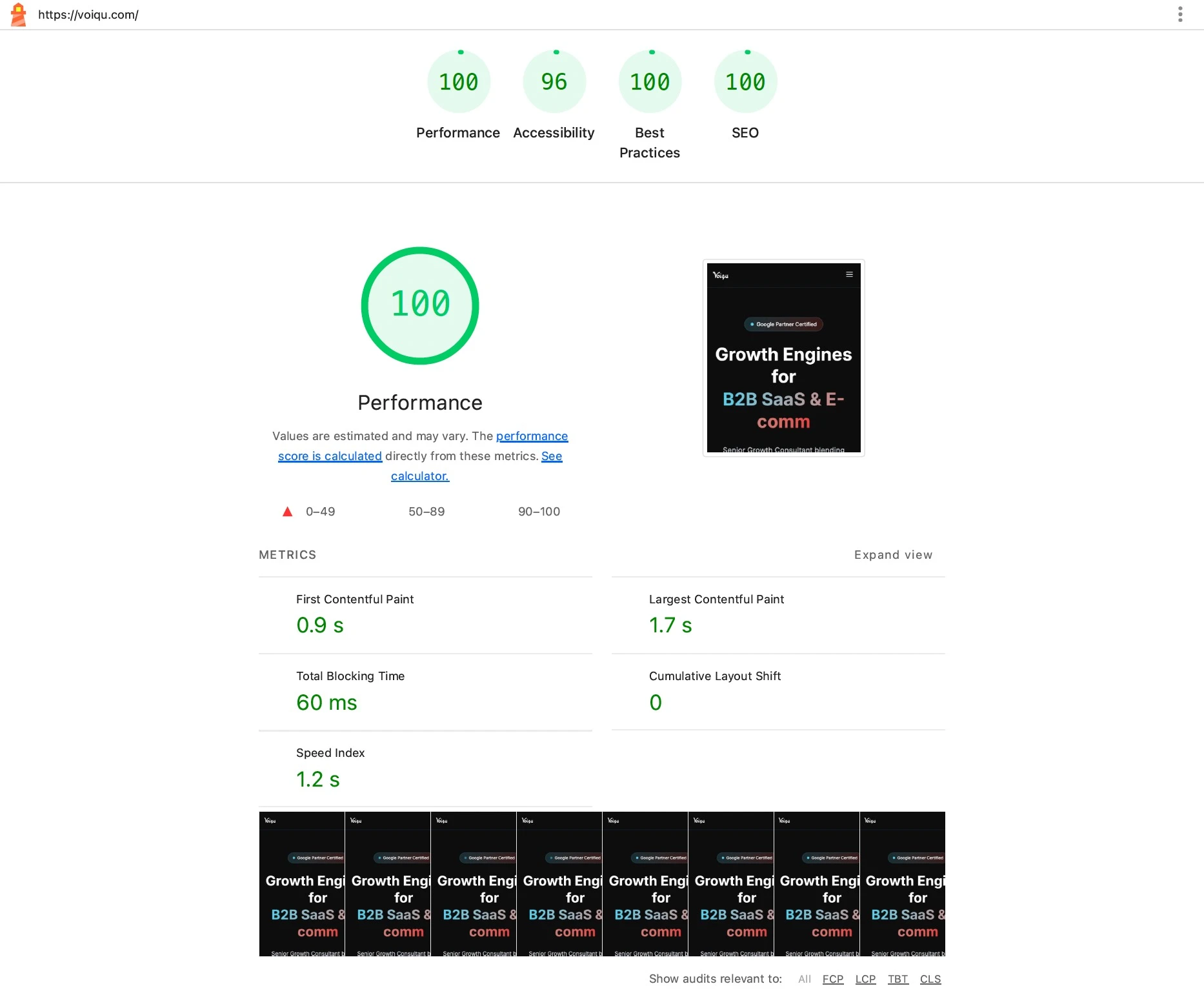
5.2. The Google Lighthouse Results: Perfection Across the Board

Running voiqu.com through Google Lighthouse yielded results that most developers spend weeks trying to achieve.

  • Performance: 100/100
    • My First Contentful Paint (FCP) hit a strong 0.9 seconds, well under the 2.5-second threshold.
    • The Total Blocking Time (TBT) was barely noticeable at 60ms, meaning the page is instantly interactive for users.
    • Cumulative Layout Shift (CLS) was a perfect 0.
  • Best Practices: 100/100
  • SEO: 100/100
  • Accessibility: 96/100 - I am incredibly proud of this, but in the spirit of transparency, the 4-point deduction came from a few low-contrast text elements. This is a common trade-off when designing a heavy, neon-on-dark Blade Runner theme. Sometimes strict contrast ratios clash with a specific aesthetic vibe.
Google Lighthouse Results

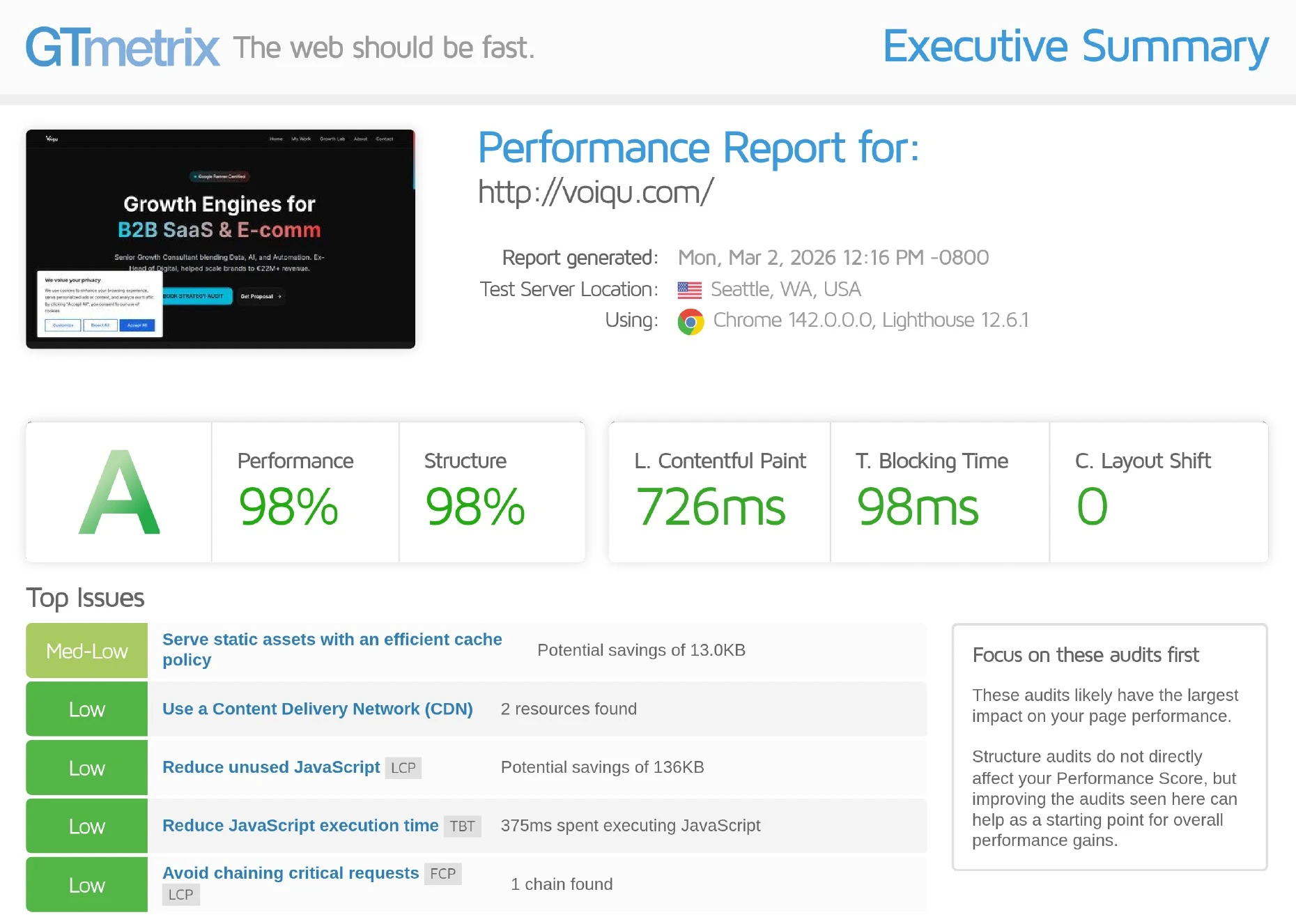
5.3. The GTmetrix Results: A Masterclass in Lean Loading

GTmetrix confirmed the Lighthouse data, proving that the site performs exceptionally well across different testing nodes.

  • Grade A (98% Performance, 98% Structure).
  • Blazing LCP: My Largest Contentful Paint clocked in at an astonishing 726 milliseconds.
  • Ultra-Lean Page Weight: The total page size is 586KB, distributed across just 51 total requests. To put this in perspective, my heaviest asset class was JavaScript at 450KB, while HTML and CSS took up barely a fraction of the payload.
  • Time to Interactive: The site is fully interactive in just 1.1 seconds.
GTmetrix Audit Results

5.4. The Free Architecture: LLMs + Netlify

How did I achieve this without a massive budget? I abandoned bloated legacy CMS structures. I "vibe coded" the site using v0, but when credits got tight, I brought in Google Antigravity to write impeccably clean, lean code. By syncing this raw, optimized code to GitHub and deploying it on Netlify's modern serverless architecture, I bypassed the heavy server-side processing (PHP/MySQL) that slows down traditional sites. The result is a site that delivers static assets instantly to the user's browser, entirely for free.

Chapter 6: The 10 Hidden Culprits Killing Your Site's Speed

Achieving a 100/100 score means relentlessly hunting down the elements that slow your site down. Based on industry data and my own teardown, here are the 10 most common bottlenecks you need to fix:

6.1. Lack of efficient caching

Without caching, your server has to re-process and re-deliver the exact same content for every single user. Implementing caching mechanisms, like dynamic page caching and browser caching, stores frequently accessed data locally or in memory, drastically improving response times.

6.2. Poor Core Web Vitals optimization

Ignoring your LCP, FID (or INP), and CLS means you are failing Google's direct page experience signals. A fast LCP reassures the user that the site is loading, while a stable CLS ensures elements don't jump around and cause accidental clicks.

6.3. Subpar hosting and server performance

Your hosting infrastructure dictates your Time to First Byte (TTFB). If your server relies on slow databases or lacks robust CDN support, your site will be slow regardless of how optimized your front-end code is.

6.4. Unoptimized, oversized images

Images that aren't properly scaled or compressed into modern formats (like WebP or AVIF) waste massive amounts of bandwidth. On voiqu.com, my total image payload was merely 149KB. Serving unoptimized images easily leads to multi-megabyte page weights that harm load times.

6.5. Inefficient code and heavy DOM sizes

Bloated JavaScript and CSS block the main thread, preventing your page from rendering. A massive Document Object Model (DOM) increases the time it takes for the browser to calculate styles and layouts. Minifying code and reducing unused scripts are mandatory steps.

6.6. Third-party script bloat

Analytics trackers, chat widgets, and cookie banners often block the main thread and ruin your Total Blocking Time. Even on voiqu.com, third-party scripts from Google Tag Manager and Microsoft Clarity were present, but they were carefully managed so they only consumed a fraction of the main-thread time.

6.7. Excessive HTTP requests

Every individual image, font, and script requires a separate HTTP request to the server. By combining files and eliminating unnecessary plugins, you reduce the number of round-trips the browser has to make. When it comes to fonts, don't waste requests on multiple heavy font weights; instead, serve a single, subsetted WOFF2 file containing only the characters you actually use, and apply font-display: swap to prevent invisible text during load times.

6.8. Lack of mobile optimization

Mobile users often rely on slower cellular connections. A site not specifically designed to be lightweight and responsive for mobile screens will suffer massive bounce rates, as users expect seamless experiences regardless of device.

6.9. Network quality constraints

The physical distance between your server and your user creates latency. Utilizing a Content Delivery Network (CDN) solves this by distributing your static files to servers globally, ensuring that a user in Tokyo gets the data from a local server rather than pinging your host in New York.

6.10. Device processing limits

Finally, you must consider the hardware of your user. A heavy, JavaScript-reliant website might load fine on a brand-new MacBook Pro, but it will completely freeze up a five-year-old budget smartphone due to CPU processing constraints. Keep your main thread work minimal so any device can parse your site instantly.

Chapter 7: The Ultimate Optimization Playbook (Actionable Steps)

7.1. Step-by-step instructions on how the reader can fix their site.

Understanding the metrics is only half the battle; now it is time to actually fix them. When I modernized voiqu.com using v0, Google Antigravity, and Netlify, I didn't rely on magic to hit that perfect 100/100 score. I followed a strict, relentless optimization process.

Whether you are hard-coding a site from scratch, deploying on a modern Jamstack, or trying to salvage a slow WordPress installation, these are the highly actionable steps you must take to optimize your website.

7.1.1. Image Optimization: Compression, WebP/AVIF formats, and lazy loading.

Unoptimized images are notoriously the largest drain on bandwidth and the most common cause of slow loading websites. Optimizing images for the web involves reducing file sizes without compromising visual quality.

  • Use Modern Formats: Never serve heavy PNGs or JPEGs if you can avoid it. Convert your images to next-generation compressed file types like WebP or AVIF, which significantly reduce file size while maintaining quality.
  • Scale Properly: Do not upload a 4000px wide image to fit into a 400px container. Serve responsive images appropriately sized for the user's specific device.
  • Lazy Loading: Images that are not immediately visible when the page loads (below the fold) should be lazy-loaded. This means the browser will only download them when the user scrolls down, drastically reducing the initial page weight.

7.1.2. Caching & CDNs: Leveraging Content Delivery Networks and browser caching.

If you force your server to generate a page from scratch for every single visitor, your Time to First Byte (TTFB) will suffer.

  • Multi-Tiered Caching: You need to take the load off your web server. Implement Dynamic Caching to bypass backend PHP/MySQL processing and serve static HTML, Memcached (Persistent Object Caching) to store frequently executed database queries, and File-based Browser Caching to instruct a user's browser to store static assets locally so repeat visits are lightning-fast.
  • Content Delivery Networks (CDNs): A CDN like Cloudflare copies your static content (images, CSS, JS) and distributes it to servers worldwide. This reduces the physical distance data must travel, slashing network latency. To take this a step further, drop the legacy CDN preloading and implement the Speculation Rules API. This modern, browser-native JSON syntax allows you to define exactly which URLs the browser should dynamically prefetch or entirely pre-render in the background based on user intent (like hovering over a link). When the user finally clicks, the subsequent page load is practically instantaneous.

7.1.3. Code Minification: Stripping unnecessary characters from CSS, JS, and HTML.

Well-structured, optimized code directly leads to faster rendering. Minifying your JavaScript and CSS files strips out unnecessary characters, whitespaces, and comments. This practice drastically reduces network payload sizes and the time it takes for a browser to parse the scripts. Additionally, you must continuously audit your code to reduce unused JavaScript and CSS, deferring anything that isn't required for above-the-fold content. By keeping my code incredibly lean, voiqu.com's entire page size was just 586KB.

Next-Level Rendering Optimization: To combat the rendering delays caused by a massive Document Object Model (DOM), implement a single line of CSS: content-visibility: auto. By applying this to heavy, off-screen sections (like long blog content or complex footers), you instruct the browser to completely skip calculating their styles and layouts until the user scrolls near them. It is essentially lazy loading for your HTML and CSS, dramatically speeding up your initial page rendering.

7.1.4. Resource Prioritization: Deferring offscreen images and loading asynchronous scripts.

Browsers are not smart enough to know what to load first unless you tell them.

  • Prioritize the LCP Image: If your Largest Contentful Paint relies on a hero image, you must force the browser to load it immediately. You can inject a <link rel="preload"> tag with a fetchpriority="high" attribute to bump the main image to the front of the line. In one case study, this simple HTML tag improved an LCP score from 2.7 seconds down to 1.2 seconds.
  • Defer Third-Party Scripts: Analytics, chat widgets, and marketing tags block the main thread and spike your Total Blocking Time (TBT). You must defer these asynchronous scripts, moving them out of the critical rendering path. Even while running Google Tag Manager and Microsoft Clarity on voiqu.com, my TBT remained at a practically invisible 60ms to 98ms because I heavily prioritized my loading sequence.

Chapter 8: The Best Tools for the Job

8.1. A roundup of the tools used to test and monitor speed.

You cannot optimize what you do not measure. To achieve and maintain top-tier speed, you need a robust testing stack.

  • Lighthouse: Built directly into Google Chrome, this is the gold standard for measuring Core Web Vitals. It simulates page loads and provides direct scores for Performance, Accessibility, Best Practices, and SEO. This is the exact tool I used to verify my 100/100 score on voiqu.com.
  • GTmetrix: An incredible diagnostic tool that breaks down your page's performance and structure. It generates intuitive waterfall charts and visually demonstrates exactly how long each asset takes to load, highlighting your FCP, LCP, and total page requests.
  • DebugBear: This is a powerhouse for continuous monitoring. It provides deep synthetic testing and Real User Monitoring (RUM). RUM captures actual user experiences from different devices and network conditions, allowing you to instantly catch performance regressions when you update code or add new plugins.
  • WP Rocket: If you are stuck managing a heavy WordPress site and can't completely rebuild it like I did, WP Rocket is the easiest way to improve load times. It is a premium caching plugin that automatically handles GZIP compression, minification, and lazy loading, often bringing 6.5-second load times down to 2.1 seconds with a few clicks.

Conclusion: Speed is a Feature, Not a Metric

9.1. Final thoughts on why fast websites win the trust and wallets of modern consumers.

It is time to stop viewing website speed as just a technical checkbox for developers. In 2026, speed is a core business feature.

A fast website isn't just about scoring a 100 on an arbitrary test, it is about respecting your users' time. When you deliver a seamless, frictionless experience, you keep users on your site longer, encourage them to explore more, and drastically elevate their opinion of your brand.

Conversely, the cost of switching is incredibly low; if a user encounters friction or a slow-loading screen, they will simply point their browser to a competitor. High bounce rates signal to Google that you are providing a poor user experience, which directly damages your organic search rankings.

By implementing strict caching, ruthlessly compressing images, leveraging CDNs, and serving modern, AI-optimized code, you do more than just appease search algorithms. You build a competitive advantage that directly translates to increased conversions and higher revenue.

Speed is no longer optional. It is the foundation of digital success.